- Products
-
 Email and Contacts API
 Unified bi-directional sync and parsing for any provider.
-
 Calendar API & Scheduler
 Real-time availability and embeddable white-label booking.
-
 Notetaker API
 Capture, transcribe, and extract structured data from meetings.
-
 Agent Accounts
 Deploy, automate, and execute intelligent actions on your behalf.
-
- Solutions
- Developers
 Sales & CRM
  Recruiting & ATS
  Healthcare
 Financial
 Legal
Legal Real Estate
 Education
 Field Services
 Docs
Docs SDKs
SDKs Tutorials
 API status
 Changelog
 Support
Jump to section

Jump to section
Introduction
Scheduling group meetings with stakeholders can be time-consuming. A custom group availability calendar can make the process much smoother.
In this post, we’ll walk through creating a group availability calendar in your React application with the Nylas Calendar API. We cover everything from development environment setup to building group scheduling features in React.
Understanding Group Meeting Types
Before we start coding, let’s cover the different type of group meetings we can have to consider: collective meetings and round-robin meetings.
Collecting Meetings
Collective meetings are when everyone needs to be there. Think team meetings, conferences, or any event where everyone’s presence is a must. The tricky part is finding a time when all team members are available. An example could be a quarterly review for your marketing team where you want to ensure everyone attends.
A group availability calendar for collective meetings allows you to spot time slots when everyone’s free and makes it easier to lock in the meeting avoiding back-and-forth emails.
Round-Robin Meetings
Round-robin meetings involve assigning one person from the group for each meeting. An example of this could be for support rotations so that you can spread the workload evenly and ensure someone’s available for customer support. The two ways to implement round-robin scheduling are max-availability and max-fairness. We’ve covered how to create round robin scheduling recently.
In this section, we’ve covered the different types of group meetings, now let’s shift gears and focus on coding to retrieve and displaying availability.
Environment Setup
Let’s get our environment setup to build a group availability calendar in React. Ensure you have the following setup:
- Node.js v18 or above and npm installed
- A working React application using Typescript
- A code editor of your choice
Group Calendar Availability in React
On the frontend, we’ll use the react-big-calendar library for our calendar component, here are the code snippets to get started:
import { Calendar, Views, momentLocalizer } from 'react-big-calendar';
import moment from 'moment';
import { useState } from 'react';
import 'react-big-calendar/lib/css/react-big-calendar.css';

const localizer = momentLocalizer(moment);


// we will go over retrieving calendar events using Nylas Calendar API next
interface GroupCalendarProps {
  events: CalendarEvent[];
}

export function GroupCalendar({ events }: GroupCalendarProps) {

  // Ensure all events have proper Date objects for start and end
  const formattedEvents = events.map(event => {
    const start = event.start instanceof Date ? event.start : new Date(event.start);
    const end = event.end instanceof Date ? event.end : new Date(event.end);
    // Create a unique ID by combining the time slot with the date and user
    const uniqueId = `${start.toISOString()}-${end.toISOString()}-${event.userId || 'default'}`;

    return {
      ...event,
      id: uniqueId, // Add unique ID to event
      start,
      end,
      title: event.title || 'Busy'
    };
  });

  // Create new Date objects for min and max times
  const minTime = new Date();
  minTime.setHours(9, 0, 0);

  const maxTime = new Date();
  maxTime.setHours(17, 0, 0);

  return (
    <>
      <div className="h-[600px]">
        <Calendar
          localizer={localizer}
          events={formattedEvents}
          startAccessor="start"
          endAccessor="end"
          defaultView={Views.WEEK}
          date={selectedDate}
          onNavigate={onDateChange}
          step={15}  // 15-minute intervals
          timeslots={4}  // 4 slots per step
          min={minTime}  // Start at 9 AM
          max={maxTime}  // End at 5 PM
          className="rounded-lg shadow-sm"
        />
      </div>
    </>
  );
}
Integration with the Nylas Calendar API
The Nylas Calendar API offers a robust solution for accessing and managing calendar data from different providers, making it an ideal choice for our group availability calendar.
Follow along with our Nylas API Quickstart to get an overview of the Nylas APIs. Here are the Node.js environment setup instructions. Make note of how to set up grants as each user must grant permissions to their calendar.
In this section, we went over how to set up Nylas and are ready to connect the calendar component and start displaying calendar availability data.
Retrieving Calendar Availability
Let’s go over the code for retrieving calendar availability, here is the code snippet to get started:
import type { Express } from "express";
import { createServer, type Server } from "http";
import Nylas from "nylas";

// For each member, ensure a grant is created: https://developer.nylas.com/docs/v3/auth/
const members = [
  {
    id: 1,
    name: "Team Member 1",
    // replace with user email
    email: "<EMAIL 1>"
  },
  {
    id: 2,
    name: "Team Member 2",
    // replace with user email
    email: "<EMAIL 2>"
  },
];

export function registerRoutes(app: Express): Server {
  const httpServer = createServer(app);

  // Calendar availability endpoints
  app.get("/api/availability", async (req, res) => {
    try {
      const nylas = new Nylas({
        apiKey: process.env.NYLAS_API_KEY!,
      });

      const availability = await nylas.calendars.getAvailability({
        requestBody: {
          startTime: new Date().setHours(9, 0, 0, 0),
          endTime: new Date().setHours(17, 0, 0, 0),
          durationMinutes: 30,
          participants: members.map((member) => ({ email: member.email })),
        },
      });

      res.json({ availability });
    } catch (error) {
      console.error("Error fetching availability:", error);
      res.status(500).json({ error: "Failed to fetch availability" });
    }
  });
Here is a larger application using the code snippets to display group availability in React:
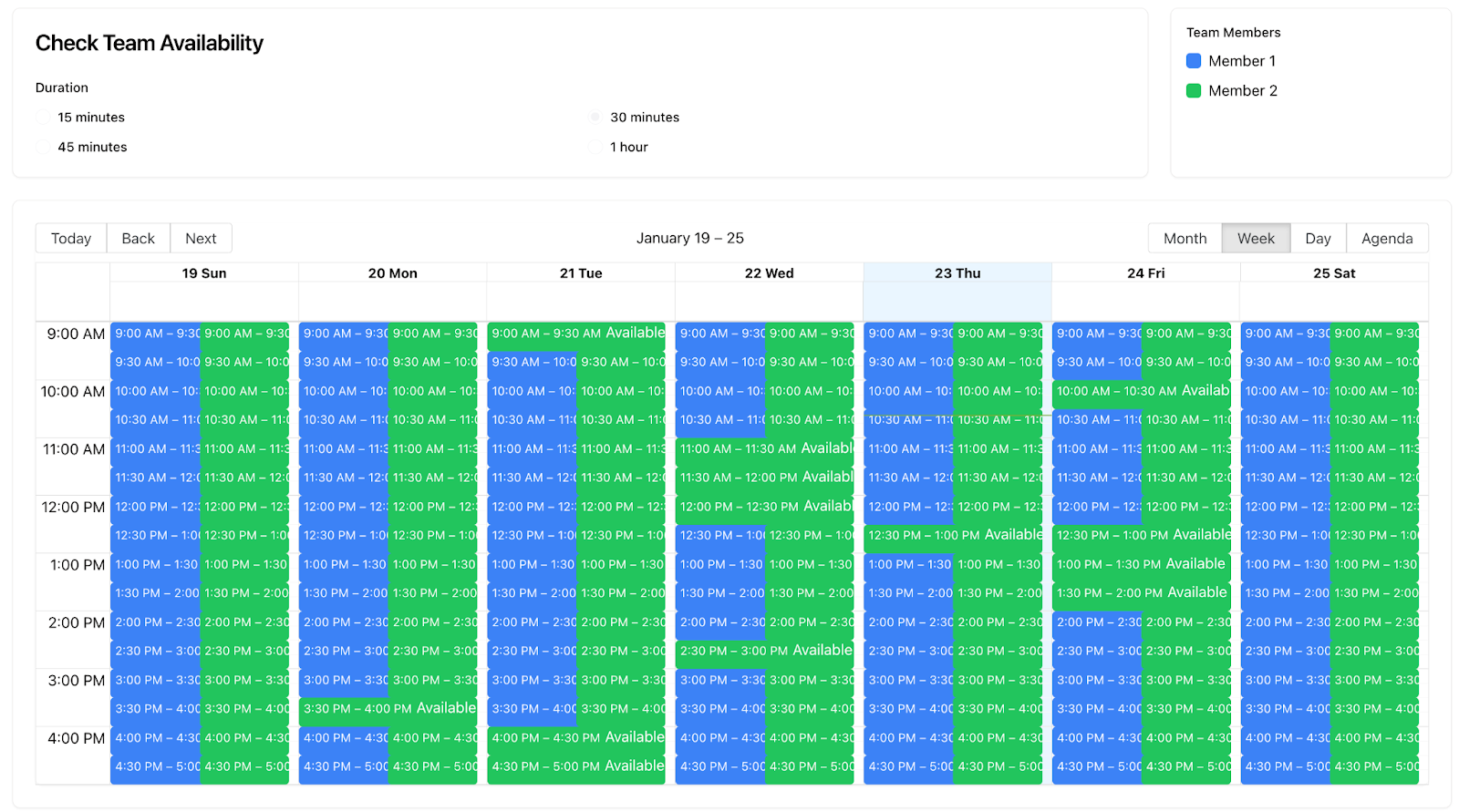
Now we have updated the backend to retrieve group availability to display on the frontend.
Build Time
In this blog post, we explored how to use Nylas Calendar API to create Group Calendar Availability in React.
You can sign up for Nylas for free and start building! Continue building with Nylas by exploring different quickstart guides or by visiting our developer documentation.


