- Products
-
 Email and Contacts API
 Unified bi-directional sync and parsing for any provider.
-
 Calendar API & Scheduler
 Real-time availability and embeddable white-label booking.
-
 Notetaker API
 Capture, transcribe, and extract structured data from meetings.
-
 Agent Accounts
 Deploy, automate, and execute intelligent actions on your behalf.
-
- Solutions
- Developers
 Sales & CRM
  Recruiting & ATS
  Healthcare
 Financial
 Legal
Legal Real Estate
 Education
 Field Services
 Docs
Docs SDKs
SDKs Tutorials
 API status
 Changelog
 Support
Jump to section

Jump to section
Introduction
We recently announced the launch of the Nylas API v3. In conjunction with the updated Nylas APIs, we are adding Generative AI functionality to our Email APIs!
As part of the Nylas Emails APIs, we are introducing Smart Compose! Our Smart Compose API endpoints allow developers to draft messages and responses to email messages using Generative AI. This will allow products and developers to easily add Generative AI functionality to their existing email integration for their end users.
In this blog post, we’ll delve into building an email responder using Smart Compose and the Nylas Node SDK!
Check out our recent livestream covering this blog post:
The email inbox
Most internet users check their emails frequently, whether it be daily or at least once a week. In recent years, the concept of inbox zero was introduced as a way to identify and tackle the vast amount of communication data we receive via email.
In a recent stream, we covered a fun way to build inbox zero functionality:
Email represents are large amount of information that we need to sort through and determine what is important and respond appropriately. In this blog post, we will explore ways to use the Nylas Email API to respond to email messages and draft new messages using Generative AI.
Why is email so important?
If we take into account that almost every user online today has an email account, this represents the largest user base compared to social media platforms:
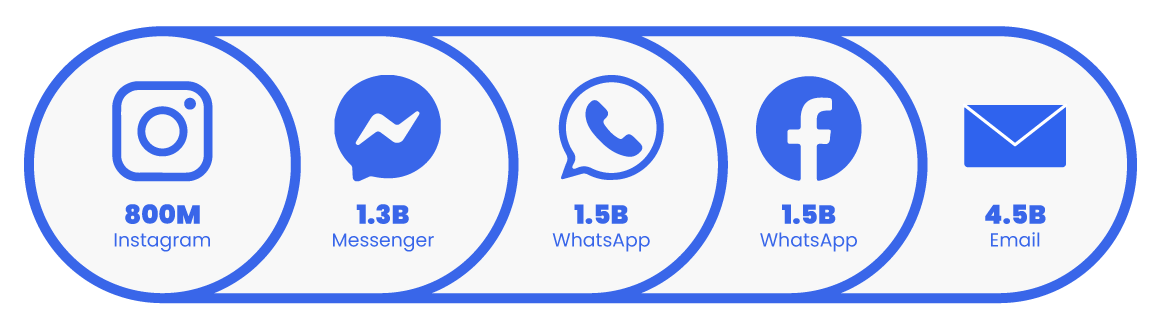
Source: Email Statistics Report, 2021-2025 | Radicati Group
The amount of data produced by email communication alone is a great opportunity to explore and consider ways to incorporate generative AI. According to the founder of Superhuman, Rahul Vohra, generative AI will change ‘everything’ we know about email.
So now that we’ve talked about email and its importance in our day-to-day communication, let’s look at ways we can generate email responses using generative AI.
Email API 🤝 generative AI
The first place we can start to explore using Generative AI is by using a GPT model like OpenAI’s chatGPT to generate an email response. Below is an example of drafting an email message requesting to attend a conference in Paris:
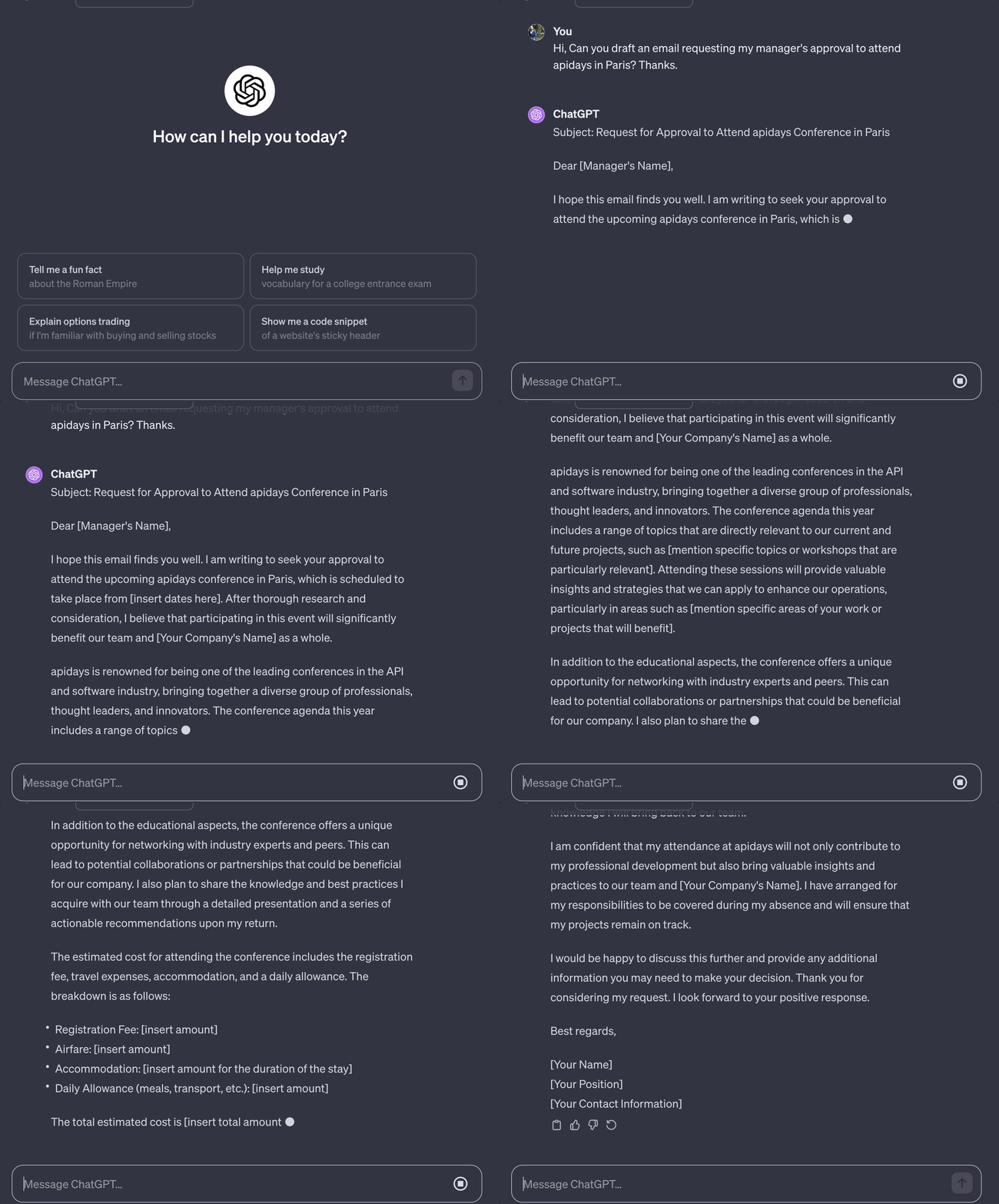
So the email is quite lengthy and we can reduce this by providing a more specific prompt, however, it does not have any additional context such as our past email conversations. This is where the benefit of using an email API comes into play.
By combining an email API and generative AI, we can use our existing emails as context when generating prompts for a generative AI model. Using an email API requires less manual effort and is more scalable!
Nylas Email API
The Nylas Email API allows us to build email CRUD (create, read, update or send, and delete) functionality for our users. It’s important to highlight that we have bidirectional email access so we can retrieve past messages, and also send messages.
Use Nylas APIs to build powerful features and user experiences by unlocking email, calendar and contacts!
Bidirectional email is different from transactional emails that are unidirectional, whereas, bidirectional email allows developers to build powerful features for their users’ communication data including combining email and generative AI.
Here are some example applications of combining email and generative AI:
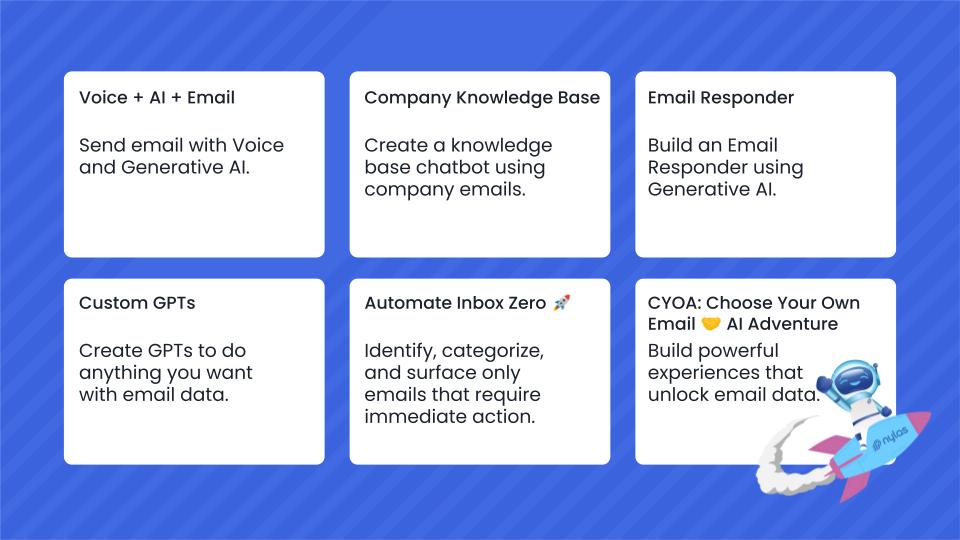
We recently completed a hackathon where developers got a chance to combine the power of generative AI and Nylas APIs to build applications.
In this section, we went over the many possibilities of combining an email API and generative AI.
Build email responder using Smart Compose
Let’s take a look at how we can build an email responder using smart compose. We recently went over how to get started with the Nylas Node SDK, so we’ll share code samples using the Node SDK.
You can sign up for Nylas for free and start building! Go ahead and sign up so you can retrieve your Nylas application credentials to use below.
Generate email drafts
Let’s first start by considering how we can generate an draft message by providing a prompt to the smart compose endpoint using the Node SDK:
import 'dotenv/config';
import Nylas from 'nylas';

const NylasConfig = {
  apiKey: process.env.NYLAS_API_KEY as string,
  apiUri: process.env.NYLAS_API_URI as string,
};

const nylas = new Nylas(NylasConfig);

async function composeEmail() {
  try {
    const message = await nylas.messages.smartCompose.composeMessage({
        identifier: process.env.GRANT_ID as string,
        requestBody: {
      prompt: 'Tell my colleague how we can use Nylas APIs in 200 words or less.',
        }
    });

    console.log('Message created:', message);
  } catch (error) {
    console.error('Error creating message:', error);
  }
}

composeEmail();
To try out the code samples, we recommend using our sandbox environment. Check out our quickstart guide to learn more about our sandbox environment.
In this code sample, we need to provide the following environment variables:
- NYLAS_API_URI is the baseUrl
- For more information, see the Data residency documentation for your specific region
- NYLAS_API_KEY is the Nylas API access token made on the Nylas Dashboard.
- GRANT_ID is the grant ID representing an end user’s Nylas account
- You can create a test grant ID using our sandbox environment
Calling the above code sample will output the following:
npm start

> [email protected] start
> node build/src/smart-compose.js

Message created: {
  requestId: '9444da36ffc74d3498738c043f57d554',
  data: {
    suggestion: 'Dear Colleague,\n' +
      '\n' +
      'Nylas APIs provide a powerful solution for integrating email, calendar, and contact functionalities directly into our applications. With Nylas, we simply connect to their API rather than writing code for each individual email provider (such as Gmail, Microsoft), which spares us the hassle of managing complex protocols.\n' +
      '\n' +
      'For emails, we can send, receive, search, and organize messages. On calendar management, we can create, update or delete events, send RSVPs and check availability. Contact management allows us to sync and manage user contacts.\n' +
      '\n' +
      'Using Nylas APIs, we perform unified API calls, regardless of the email service. For security, Nylas also ensures top-notch, as they encrypt, isolate, and regularly audit all data.\n' +
      '\n' +
      'Hence, by integrating Nylas APIs, we not only save significant development time, but also enhance the features and functionalities of our application.\n' +
      '\n' +
      'Best,\n' +
      '[Your Name]'
  }
}
Note that for using smart compose, configuring the AI model is not available today, however, you can consider using any AI model of your choice with our Email APIs. Take a look at our recent stream and self-paced workshop where we build an email responder using generative models from hugging face.
In this section, we looked at how we can generate draft messages.
Respond to email messages
Next, let’s look at how we can respond to existing messages using smart compose specifically the Node SDK composeMessageReply function. In the below example, we are going to pass in the ID of an email message (MESSAGE_ID) we received and ask the Nylas Email API to generate a response with a prompt:
import 'dotenv/config';
import Nylas from 'nylas';

const NylasConfig = {
  apiKey: process.env.NYLAS_API_KEY as string,
  apiUri: process.env.NYLAS_API_URI as string,
};

const nylas = new Nylas(NylasConfig);

async function composeEmailReply() {
  try {
    const message = await nylas.messages.smartCompose.composeMessageReply({
        identifier: process.env.GRANT_ID as string,
        messageId: process.env.MESSAGE_ID as string,
        requestBody: {
          prompt: 'Respond to the email in 150 words or less',
        }
    });

    console.log('Message created:', message);
  } catch (error) {
    console.error('Error creating message:', error);
  }
}

composeEmailReply();
To retrieve a message ID, take a look at our developer docs for examples of how to retrieve messages.
Calling the above code sample will output the following:
npm start

> [email protected] start
> node build/src/smart-compose-response.js

Message created: {
  requestId: 'c137c02c20eb410f910752ffbf6fb8fd',
  data: {
    suggestion: 'Hi John, \n' +
      "Great! I'll be sure to provide you with detailed information particularly on how to best utilize Nylas with NextJS and MongoDB for your app. We really appreciate your interest in using Nylas and the patience in getting the answers you need. I believe our discussion on the developer forums will also be beneficial for the broader community. Look out for an update from me by the end of the week.\n" +
      'Best,\n' +
      'Ram'
  }
}
In this example, we looked at how we can generate responses to email messages.
Build time!
The release of the Nylas API v3 brings new features and functionality to the world of email including smart compose. By combining the power of email data and generative AI, products and developers can unlock users’ email data and ship new experiences empowering their users.
You can sign up for Nylas for free and start building! Continue building with Nylas by exploring different quickstart guides or visiting our developer documentation.


